From Fragmented Management to Centralized Control Liquidware Introduces FleetCTRL
Liquidware announced the launch of its new product, FleetCTRL, at Microsoft Ignite.
But why did Liquidware build this? That became clear in a conversation I had with David Bieneman at Liquidware Exchange. He told me how the idea came about and what questions customers kept bringing to him. Many of them are migrating to the Microsoft ecosystem, and along the way they run into trouble managing Azure Virtual Desktop (AVD) host pools and Windows 365 Cloud PCs.
AVD and Windows 365 work closely together, but from a management perspective they are two separate solutions. Migration projects often underestimate that difference.
The result is a mix of management portals, configuration models, and lifecycle processes, with responsibilities spread across teams and costs for licenses and infrastructure that could have been avoided. What’s missing is one place where administrators can see and manage the full state of both their AVD and Windows 365 environments. That is the gap Liquidware wants to close with FleetCTRL.
What is FleetCTRL?
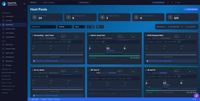
FleetCTRL is a management platform that adds extra management and automation features to Azure Virtual Desktop. With it, you can right-size and scale your AVD host pools and session hosts, manage images and user sessions, and bring Windows 365 Cloud PCs into the same console.
Why should customers consider FleetCTRL?
Liquidware focuses on several key challenges customers face when managing AVD and Windows 365 environments.
- Centralized management: One console for your AVD host pools, session hosts, and Windows 365 Cloud PCs, so you no longer jump between portals. Galleries, image versions, and test copies keep your golden images organized and ready to deploy.
- Cost savings: Idle compute gets shut down and capacity follows actual demand. You stop paying for VMs nobody is using.
- Self-healing: Broken hosts and inconsistent images are spotted early, and where possible fixed automatically.
- Security: Because everything runs in your own tenant, your data and credentials never leave your security boundary. That makes a difference if your organization has strict requirements.
- No vendor lock-in: Modernize your existing VDI environment now, and move back to native Azure whenever you want.
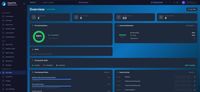
- Windows 365 management: Provisioning, connectivity, and license utilization of your Cloud PCs, right next to your AVD environment.
And there is more!
Besides the features mentioned above, FleetCTRL offers several additional capabilities:
- AI agent: Ask the built-in assistant questions about your environment in plain language. It explains configurations and helps you make sense of what you’re seeing.
- Historical insights: See how your environment has behaved over time, including the history and activity of individual hosts. Handy when you need to find out what happened last week, not just right now.
- Cost insights: See where your cloud spend goes and where you can save. The savings are measurable, so you can show what the platform actually delivers.
- Custom healing actions: Build your own remediation steps and decide in which order they run. That way, you can automate the fixes you would otherwise do by hand.
- Automation: Run routine maintenance, such as installing Windows Updates or updating the AVD agent. You can chain scripts, Azure actions, and wait periods into runbooks that roll out across your hosts in batches.
- App Attach: Deliver FlexApp and MSIX packages to your host pools and track every application instance in one view. Other App Attach partners are supported too, so you’re not tied to one approach.
- Flexible licensing: FleetCTRL will be available with either named user or concurrent licensing.

Conclusion
Moving to AVD and Windows 365 is only the first step. Once the desktops are running, the daily work begins managing hosts, automating maintenance, keeping things secure, and keeping costs under control. This is where many customers struggle, and where FleetCTRL aims to help.
By bringing AVD host pools and Windows 365 Cloud PCs together in one console, running inside your own Azure tenant, Liquidware gives administrators a single place to see what is happening and act on it.
I'm interested to see how FleetCTRL develops and how well the automation and self-healing capabilities work in real-world environments. Managing AVD and Windows 365 together is something many customers will have to deal with, so I'll definitely keep an eye on this product.
More details on the FleetCTRL page: https://www.liquidware.com/fleetctrl